|
|
 |
|
|
|
 |
|
|
 |
|
|
- The system bias is to use the tool that is numerically closest to the CAD feature under consideration.
So even among the tools that fall within the specified tolerance, the best round tool will be selected.
- The system is also weighted toward using single hits for punching hole shapes whenever the system settings allow for it.
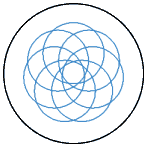
- Tolerance factors (“plus” and “minus”) allow users to dictate the amount of allowable variance between the diameter in the CAD
drawing and the diameter of a single tool used to punch it. For holes between 1.500” and 2.000”, for instance, the rules file could list a plus variance of .006” and a minus
variance of .003”. This allows the system to automatically map a round punch to the hole in the part as long as it falls within the allowable variance.
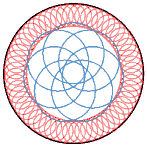 If no tool is found that falls within the allowable variance, pre-defined punching parameters are applied for “roughing out” the
core of the circle and then nibbling constraints are applied to “finishing off” the circle’s edge. These include specifying the tools to be used and the allowable scallop for nibbling If no tool is found that falls within the allowable variance, pre-defined punching parameters are applied for “roughing out” the
core of the circle and then nibbling constraints are applied to “finishing off” the circle’s edge. These include specifying the tools to be used and the allowable scallop for nibbling- All of the above functions are completely automatic and require no user interaction
|
|
|
|