|
Note:
It should be
understood that the Proto System automatically performs repositions requiring no user input. The features highlighted here are designed to address specific situations and are available to the
NC programmer when needed.
PLACING and MOVING CLAMPS
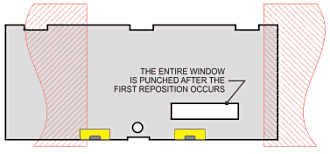
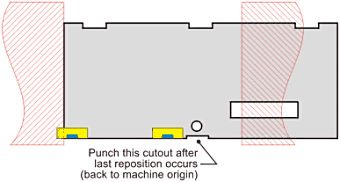
Users may now graphically place Clamps, Hold-downs, and specify reposition amounts in the CAD
environment.
Placement of clamps is
performed in the active CAD drawing, allowing the user to avoid clamp collisions.
The clamps are pre-positioned vertically so that the horizontal location of each clamp is all that the programmer has to specify.
No Punch masks are
automatically placed which graphically indicate the NC machine’s table limits. Users can see at a glance if a reposition is required.
The clamps are displayed to
reflect areas of interference with the various station sizes of the the NC punch.
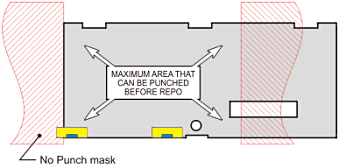
When a Reposition is called for, Hold-downs appear on the
cross-hair for placement by the user. Both the X and Y location are determined by the user. Then, both the clamps and the ‘NO PUNCH’ masks are automatically selected to be
moved (in the X axis only).
|